Why FluxVLA Engine Matters
If you have fine-tuned a VLA model with LeRobot, run a LIBERO benchmark, and then tried to move that policy to ALOHA, Franka, UR3, TRON 2, or a real humanoid, you already know the gap: a checkpoint is not a robot system. A deployable manipulation stack still needs camera ordering, observation.state, action dimensions, normalization statistics, action horizons, simulator wrappers, inference scheduling, remote GPU serving, safety stops, ROS or SDK bridges, and a way to feed failed rollouts back into training.
FluxVLA Engine is built for that gap. The paper FluxVLA Engine: A One-Stop VLA Engineering Platform for Embodied Intelligence was submitted to arXiv on September 15, 2026 by LimX Dynamics and collaborators. The important point is that FluxVLA is not claiming to be a new VLA architecture. It is an open-source, configuration-driven engineering platform that brings multiple policy families into one reproducible loop: data → training → evaluation → inference → real-robot deployment.
In practical terms, LeRobot hands-on helps you record demonstrations and structure datasets, while OpenVLA deep dive explains the model side of vision-language-action learning. FluxVLA sits one layer lower in the engineering stack: it gives VLA, WAM, and offline-learning policies a shared path from data to physical execution. This guide walks through the paper idea, architecture, installation, training, evaluation, inference, and real-robot deployment checklist.

The Core Paper Idea
The problem described in the paper is familiar to robotics engineers: a manipulation model can work in a notebook and still fail as a robot product. Once you move outside the original repository, hidden assumptions surface. One dataset stores wrist camera first, another stores third-person camera first. One model predicts action deltas, another predicts absolute joint targets. Training uses mean/std normalization, deployment needs min/max or quantile denormalization. Simulator success rates are computed with different trial counts. A real robot adds latency, network jitter, gripper delay, controller limits, and safety constraints.
FluxVLA approaches this as a systems problem. The experiment is not just a neural network; it is a versioned contract that includes data transforms, model construction, training runner, evaluation protocol, inference runner, serving path, and robot operator. A single configuration file becomes the source of truth. Registry-based interfaces make it possible to add datasets, models, action heads, evaluators, or robot operators without copying the entire workflow.
The paper frames the platform around four principles:
- Unification: one experiment description connects data, model, optimization, evaluation, inference, and deployment.
- Modularity: data, model, execution, serving, and operator layers have explicit boundaries.
- Deployability: the trained artifact can reconstruct the policy for simulation evaluation or real-robot inference.
- Reproducibility: configuration, checkpoints, transforms, statistics, and evaluation artifacts stay tied together.
The authors are also careful about claim boundaries. FluxVLA does not say that one new model beats every prior method. Its quantitative tables mix many architectures, pretraining sources, budgets, and evaluation protocols. The value is the shared engineering path: heterogeneous policies can be trained, evaluated, accelerated, served, and deployed through auditable contracts.
Architecture: From LeRobot Sample to Robot Command
FluxVLA separates the system into five layers.
The data layer reads episodes from Parquet or LeRobot-style datasets, then applies configuration-defined transforms. These transforms map camera views, robot state, language instructions, action horizons, normalization, and temporal sampling into the sample dictionary expected by the model. For beginners, the rule is simple: if a preprocessing choice affects training or deployment, keep it in the config instead of hiding it in a one-off script.
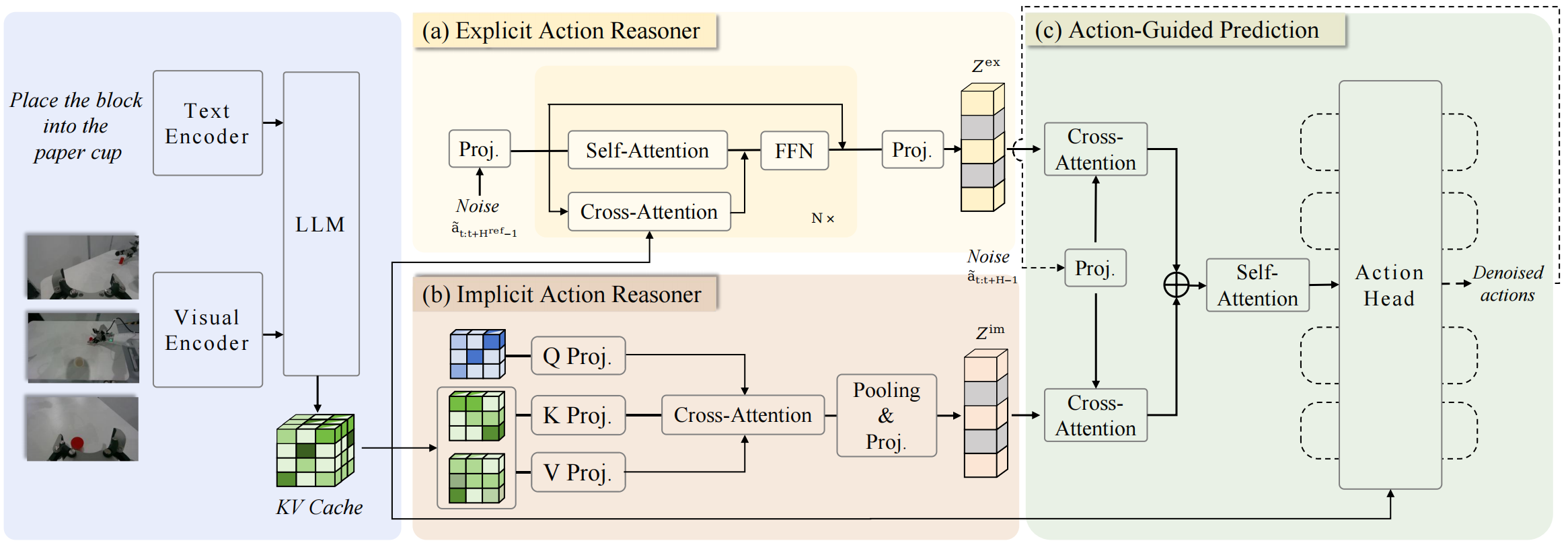
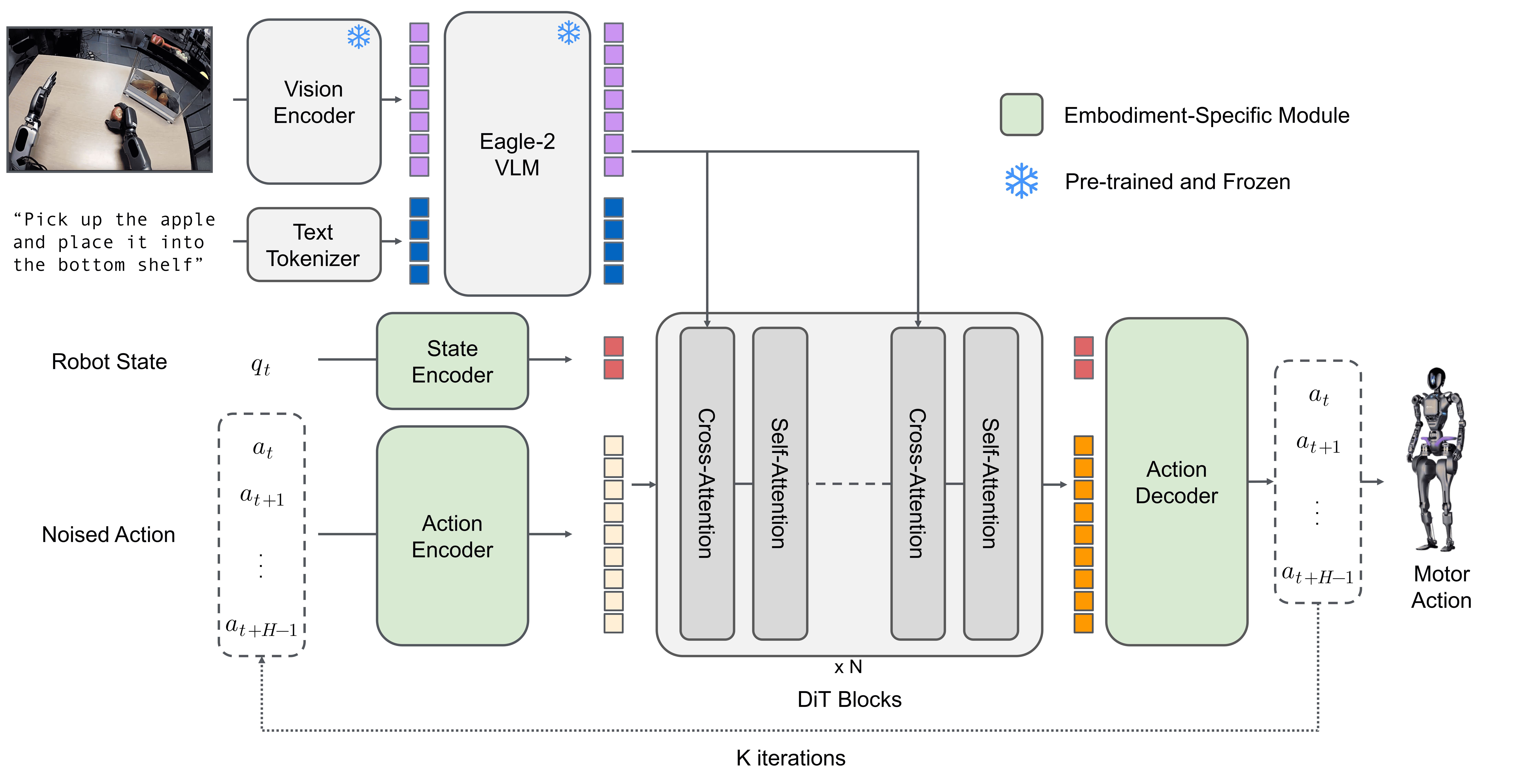
The model layer consumes that sample dictionary and returns a loss during training or an action chunk during inference. FluxVLA supports several action interfaces: autoregressive token prediction as in OpenVLA/FAST-style models, continuous flow matching as in Pi0 and Pi0.5, diffusion-style heads, and world-action models such as DreamZero, FastWAM, and DiT4DiT. This is why the engine can host SmolVLA, OpenVLA, GR00T, Pi0, Pi0.5, DreamZero, Cosmos3, FastWAM, and DiT4DiT without forcing every model into the same internal architecture.
The execution layer owns distributed setup, optimization, scheduling, checkpointing, evaluation loops, resume logic, and metric logging. Local debugging can call torchrun scripts/train.py; cluster runs can use scripts/train.sh.
The serving layer separates policy inference from the robot process. This matters when the robot has a Jetson or compact industrial PC while the model needs a workstation GPU. FluxVLA includes a ZMQ-based remote inference path, so the robot can send observations to a GPU server and receive action chunks back with explicit timeout and recovery behavior.
The operator layer connects a simulator or robot SDK to the framework-level contract. The operator reads sensors, synchronizes timestamps, translates actions into joint/eepose/gripper commands, and handles the hardware boundary. The paper emphasizes keeping runners and operators separate: runners decide model-side scheduling, RTC state, and local versus remote inference; operators own hardware I/O.
Installation
The main repository is https://github.com/FluxVLA/FluxVLA. At the time of writing, the README recommends Python 3.10 and an installer with three modes: sim-only, real-only, and full. Start with sim-only if you only want LIBERO or RoboCasa. Move to real-only or full once you have physical hardware.
conda create -n fluxvla python=3.10 -y
conda activate fluxvla

# Simulation / LIBERO / RoboCasa runtime
bash scripts/install_env.sh sim-only

# For both simulation and real-robot workflows:
# bash scripts/install_env.sh full
The installer handles several painful pieces: PyTorch CUDA profile selection, FlashAttention wheels, FFmpeg/TorchCodec, MuJoCo EGL setup, and optional RoboCasa source checkouts. Real-robot runners still require the system-level ROS or robot SDK installation. For ROS Noetic, source ROS before inference:
source /opt/ros/noetic/setup.bash
For Jetson Orin, FluxVLA provides a Docker runtime:
docker pull fluxvla/fluxvla:fluxvla-orin-1.0.0
scripts/run_docker.sh
The project reports Jetson Orin support and edge inference acceleration reaching 7.4 Hz for GR00T-N1.5. Treat this as model-side or runtime evidence, not as a guarantee of final control-loop rate. The end-to-end robot frequency still depends on cameras, transport, post-processing, robot middleware, and controller settings.
Dataset Preparation with LeRobot
FluxVLA uses the LeRobot format as a practical entry point for robot demonstrations. A private manipulation dataset should preserve the episodic structure:
dataset/
├── data/
│   └── chunk-000/
│       ├── episode_000000.parquet
│       └── episode_000001.parquet
├── meta/
│   ├── episodes.jsonl
│   ├── episodes_stats.jsonl
│   ├── info.json
│   └── tasks.jsonl
└── videos/
    └── chunk-000/
        └── camera_name/
            ├── episode_000000.mp4
            └── episode_000001.mp4
If you do not have data yet, use the prepared FluxVLA datasets first. For LIBERO-10:
huggingface-cli download limxdynamics/FluxVLAData \
  --repo-type dataset \
  --include "libero_10_no_noops_lerobotv2.1/*" \
  --local-dir ./datasets
For RoboCasa GR00T training with the 30-demo subset:
huggingface-cli download limxdynamics/FluxVLAData \
  --repo-type dataset \
  --include "robocasa_gr1_24tasks_first30ep/*" \
  --local-dir ./datasets
Normalization is one of the easiest places to make a silent mistake. FluxVLA includes a tool that computes transformed statistics after applying coordinate and action-profile transforms. That order matters: the statistics should match the semantics seen by both training and inference.
python tools/compute_transformed_dataset_stats.py /path/to/ur3 \
  --profile ur3 \
  --action-horizon 50 \
  --variable-name _PI05_UR3_STATS \
  --output /tmp/ur3_stats.py
For ALOHA and Pi0.5 parity, the README warns against regenerating official Trossen statistics unless you intentionally want a new calibration. For your own robot, generate your own stats and use the same dictionary for train_dataloader.dataset.dataset_statistics and inference.denormalize_action.norm_stats.
Choosing a Policy Family
FluxVLA is an engine, not a single model. Your choice depends on compute, task length, and deployment target.
| Use case | First model to try | Why |
|---|---|---|
| Pipeline debugging, small GPU | SmolVLA | Lightweight and easy to iterate |
| Smooth manipulation policy | Pi0 / Pi0.5 | Flow-matching action chunks, strong configs |
| Generalist or humanoid-leaning control | GR00T N1.5 / N1.7 | Good deployment and acceleration paths |
| World-action modeling | FastWAM, DiT4DiT | Strong benchmark results, higher compute cost |
| Open-source VLA baseline | OpenVLA | Widely understood 7B baseline |
If your goal is a small lab setup, start with SmolVLA or Pi0.5 before jumping into heavier world-action models. For background, see SmolVLA training on consumer GPUs and Pi0-FAST training.

Training: Debug Locally, Then Scale
Do not start with a full cluster run. First verify the data path, checkpoint path, statistics, batch shape, and config semantics on one or two GPUs. Example Pi0.5 training on LIBERO-10:
export WANDB_MODE=disabled
torchrun --standalone --nnodes 1 --nproc-per-node 2 scripts/train.py \
  --config configs/pi05/pi05_paligemma_libero_10_full_finetune.py \
  --work-dir ./work_dirs/pi05_paligemma_libero_10_full_finetune \
  --cfg-options train_dataloader.per_device_batch_size=2
For a RoboCasa GR00T smoke test, the README provides a short two-step run:
WANDB_MODE=disabled TOKENIZERS_PARALLELISM=false \
torchrun --standalone --nnodes 1 --nproc-per-node 1 scripts/train.py \
  --config configs/gr00tn15/gr00tn15_eagle_3b_robocasa_30_eps_full_finetune.py \
  --work-dir work_dirs/smoke_groot_robocasa_train \
  --cfg-options \
    runner.type=FSDPTrainRunner \
    runner.sharding_strategy=no-shard \
    train_dataloader.per_device_batch_size=1 \
    runner.enable_gradient_checkpointing=False \
    runner.max_steps=2 \
    runner.save_iter_interval=1 \
    runner.max_keep_ckpts=2 \
    "runner.metric.active_trackers=('jsonl',)"
Once local debugging is clean, move to the cluster launcher:
export WANDB_MODE=disabled
bash scripts/train.sh [CONFIG] [WORK_DIR] \
  --cfg-options \
    train_dataloader.per_device_batch_size=[PER_DEVICE_BATCH_SIZE] \
    train_dataloader.batch_size=[GLOBAL_BATCH_SIZE] \
    runner.max_steps=[MAX_STEPS] \
    runner.save_interval=[SAVE_INTERVAL] \
    runner.max_keep_ckpts=[MAX_KEEP_CKPTS] \
  --eval-after-train
The --eval-after-train option is especially useful. The checkpoint produced by training is handed to the evaluator defined by the same experiment configuration, reducing the chance of mismatched preprocessing, wrong checkpoint paths, or inconsistent evaluation settings.
To resume:
bash scripts/train.sh [CONFIG] [WORK_DIR] \
  --resume-from [CHECKPOINT_PATH] \
  --cfg-options runner.max_steps=[MAX_STEPS]
Evaluation: Measure Closed-Loop Behavior
For manipulation, validation loss is not enough. A model can predict demonstration-like actions and still fail when the cube is displaced, a wrist camera is partially occluded, or the gripper contacts early. FluxVLA supports closed-loop LIBERO and RoboCasa evaluation, with rollout artifacts for later inspection.
Local Pi0.5 evaluation:
export WANDB_MODE=disabled
torchrun --standalone --nnodes 1 --nproc-per-node 2 scripts/eval.py \
  --config configs/pi05/pi05_paligemma_libero_10_full_finetune.py \
  --ckpt-path checkpoints/pi05_paligemma_libero_10_full_finetune_bs64/checkpoints/step-028548-epoch-18-loss=0.0111.safetensors
RoboCasa GR00T evaluation:
MUJOCO_GL=egl WANDB_MODE=disabled TOKENIZERS_PARALLELISM=false \
PYTHONHASHSEED=7 \
torchrun --standalone --nnodes 1 --nproc-per-node 1 scripts/eval.py \
  --config configs/gr00tn15/gr00tn15_eagle_3b_robocasa_30_eps_full_finetune.py \
  --ckpt-path work_dirs/gr00t_eagle_3b_robocasa_gr1_24x30_finetune_bs64/checkpoints/step-010000.safetensors \
  --cfg-options \
    eval.norm_stats_path=work_dirs/official_groot_gr1_dataset_statistics.json \
    eval.output_dir=work_dirs/gr00t_eagle_3b_robocasa_eval \
    eval.num_trials_per_task=50 \
    eval.seed=7
The paper reports LIBERO averages for many integrations: SmolVLA at 84.70%, GR00T N1.5 at 95.30%, Pi0 at 96.85%, Pi0.5 at 97.95%, FastWAM-Joint at 98.35%, and DiT4DiT at 98.65%. RoboCasa GR-1 is much harder: Pi0.5 full-data reports 51.42%, DiT4DiT reports 57.25%, and SmolVLA reports 8.75%. These numbers should not be read as a controlled leaderboard because pretraining, optimization, checkpoints, and evaluation budgets differ. For your team, freeze simulator version, seed, action horizon, checkpoint selection, and trial count before comparing models.
Inference Acceleration, RTC, and Post-Processing
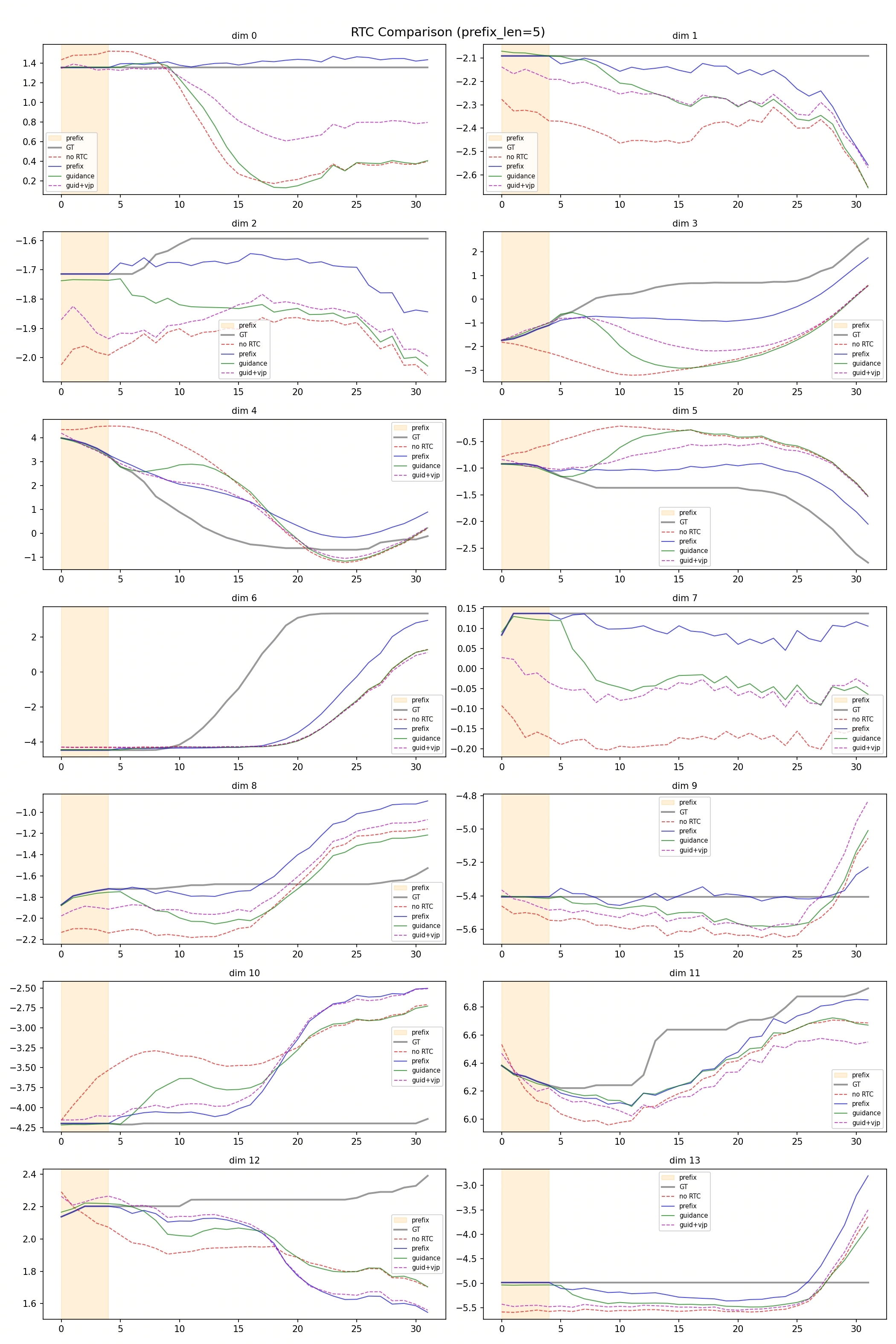
FluxVLA is more than a training wrapper because it treats runtime as part of the platform. Most modern VLA policies output an action chunk, often 16 to 50 steps. While the robot executes the current chunk, the model predicts the next chunk. If chunk boundaries are discontinuous, the robot can jerk, drift, or reject commands.
FluxVLA integrates RTC (Real-Time Chunking) to reduce discontinuities between committed actions and the next prediction. For policies that support Training-time RTC, inference can condition directly on the action prefix already committed for execution. After denormalization, trajectory post-processing such as joint MPC or Ruckig filtering can further smooth commands and respect motion bounds.
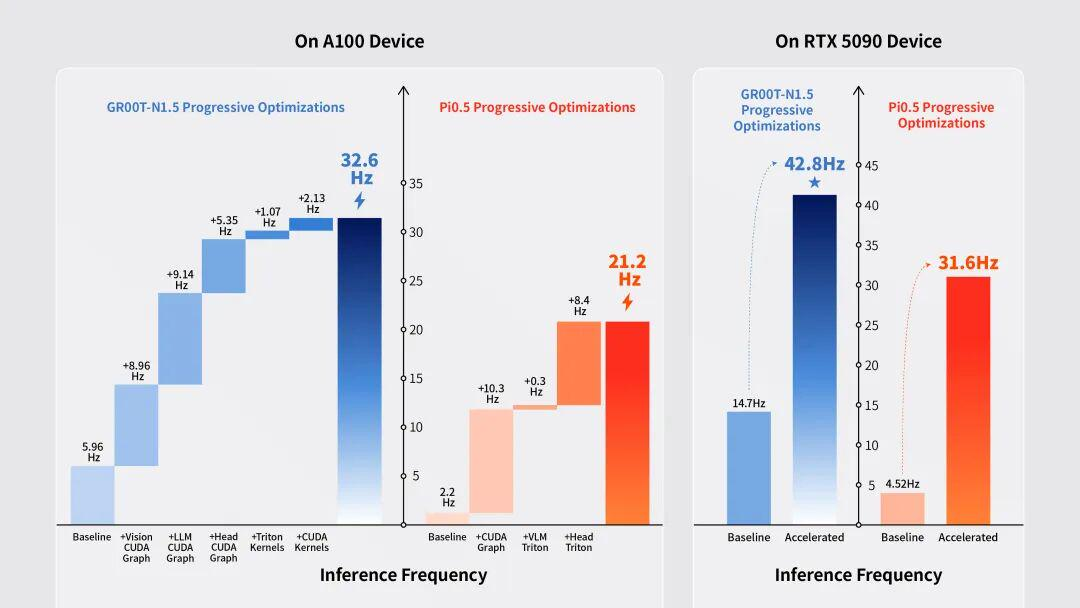
The paper reports acceleration through Triton fused kernels, CUDA Graph replay, and custom CUDA operators. On A100, GR00T increases from 5.96 Hz to 32.6 Hz, and Pi0.5 increases from 2.20 Hz to 21.2 Hz. On RTX 5090, GR00T + RTC increases from 15.0 Hz to 47.6 Hz. These are model execution frequencies, not guaranteed end-to-end robot control rates, but they matter because the robot needs the next chunk before the active chunk expires.
Real-Robot Deployment
A minimal deployment path has four stages.
First, install the robot-side environment. If the robot has only a Jetson or compact PC, run a smaller model locally or use remote GPU inference. If the robot uses ROS Noetic, source ROS first. If it uses a vendor SDK, implement or adapt an operator that translates observations and actions according to the FluxVLA config.
Second, verify the observation contract. Camera resolution, camera names, proprioception vector layout, gripper range, timestamps, and action frequency must match training. A classic failure is training with [front, wrist] but deploying with [wrist, front].
Third, run the real-robot inference script.
python scripts/inference_real_robot.py \
  --config [CONFIG] \
  -- ckpt-path [CKPT_PATH]
The README currently shows -- ckpt-path with a space after --. If your installed version expects --ckpt-path, follow python scripts/inference_real_robot.py --help. The syntax is less important than ensuring the config contains the correct inference.denormalize_action, robot operator, control mode, and action execution settings.
Fourth, prioritize safety over speed. Add workspace limits, velocity limits, acceleration limits, gripper force limits, emergency stop, and timeouts. Do not send raw policy outputs directly to a low-level torque controller unless you already have a serious safety layer. Start with clamped joint-position or eepose commands at low speed.
The paper includes real-robot evidence on ALOHA and Oli. On five ALOHA tasks, GR00T N1.5 succeeds in 36 of 110 trials (32.73%), while Pi0.5 succeeds in 70 of 110 trials (63.64%). On Oli, Pi0.5 performs better on candy picking and full box transport, while GR00T N1.5 performs better on basket-and-toy picking. The lesson is healthy: the deployment engine standardizes the path, but policy choice still depends on task, embodiment, and data.
A Practical Lab Roadmap
For a small robotics lab moving from LeRobot to a real robot, use this staged plan:
- Collect 50-100 LeRobot episodes for one simple task, such as picking a cube into a tray.
- Keep or convert the dataset to LeRobot v2.1 or v3.x and inspect video metadata.
- Start FluxVLA with the closest SmolVLA or Pi0.5 config, small batch size, and
WANDB_MODE=disabled. - Evaluate in LIBERO or RoboCasa if the task maps cleanly, or create a minimal simulator/operator wrapper.
- Run dry inference on the real robot: feed real observations, block commands, and log predicted actions.
- Enable low-speed robot execution with workspace clamps and a physical emergency stop.
- Save failures, human corrections, and reward/progress annotations for the next training round.
For longer-horizon tasks, consider ARM/SARM reward modeling or DAgger-style correction. FluxVLA already includes ARM/SARM workflows for LeRobot v2.1/v3.x datasets. The paper cites a companion ARM workflow where an eight-stage AgileX ALOHA towel-folding task improves from 62.1% with behavior cloning to 99.4% with ARM-based AW-BC. Read that number with its stated provenance, but the direction is clear: the platform is meant to support iterative data, reward, training, and deployment loops, not just one-shot supervised cloning.
Beginner Mistakes to Avoid
Do not train with one action representation and deploy with another. Delta joints, absolute joints, eepose targets, and gripper ranges are not interchangeable.
Do not compare models using checkpoints from different sources while changing simulator seed, trial count, or evaluation budget. FluxVLA gives you a shared evaluator, but you still need to freeze the protocol.
Do not ignore latency. If the model runs at 3 Hz and the robot needs smooth 30 Hz behavior, you need action chunking, RTC, post-processing, better local acceleration, or remote GPU serving.
Do not treat technical media as decoration. In robotics, diagrams and traces help readers audit the pipeline. All inline images in this article come from the FluxVLA paper or repository and were verified with HTTP 200 and Content-Type: image/png.
References
- Paper: FluxVLA Engine: A One-Stop VLA Engineering Platform for Embodied Intelligence
- Repository: FluxVLA/FluxVLA
- Model hub: limxdynamics/FluxVLAEngine
- Product page: FluxVLA Engine by LimX Dynamics